How to bring legacy software into line with IEC 62304? - part 1
By Mitch on Friday 22 February 2013, 14:09 - Standards - Permalink
Most of medical devices manufacturers have legacy software that was not designed according to IEC 62304. The devices that embed legacy software were once verified and validated. These devices and their software work well and no major adverse event were raised by software issues.
But one day, the manufacturer decides that it's time to bring that legacy software into line with IEC 62304, to align the technical file of that software (or the contribution of software to technical file content) with up-to-date standard or regulatory requirements.
Usually, the reason that triggers this decision is either to design a new version of an existing device or to integrate that software in a new medical device.
How to do it? The content of the action plan will be different, depending on the type of legacy software or the type of changes made to the legacy software.
Types of changes made to legacy software
There are many possible types of changes that can be made to an existing software. One way to to sort them is according to the deepness of changes in design or in functionalities:
- No changes: neither architecture, nor detailed design, nor functionalities are changed. Some bugs may be fixed, though,
- Slight changes: the software architecture is not modified, only detailed design is modified, and/or existing functionalities are enhanced or updated,
- Deep changes: the software architecture is deeply modified and/or new functionalities are added.
1st case: Legacy software is not changed
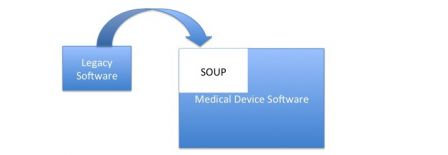
This case is the most simple, and the answer is straightforward: treat legacy software as a SOUP.
Risk analysis
The SOUP is an input data of design, first at system level and second at software level. Like any other SOUP, the necessary tasks are focussed on risk assessment:
- Identify functional and technical requirements managed by the SOUP,
- Do a risk analysis of these functional requirements,
- Do a risk analysis of SOUP integration in the medical device,
- Do a risk analysis of known bugs in the SOUP
Software mitigation actions
The software mitigation actions output of the risk analysis may be of two types:
- Either the mitigation actions are made in the architecture of software that integrates the SOUP, for instance with a mitigation layer,
- Or the mitigation actions require to modify the legacy software.
The first solution is theoretically the best one with a SOUP. But the second solution may be the best to implement, when the manufacturer has the source code - and the knowledge - to modify the legacy software.
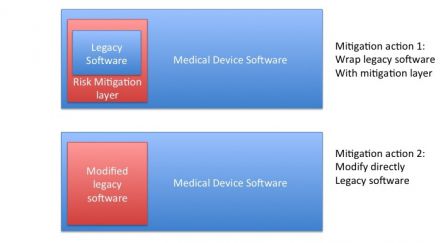 While the second solution is probably the best, the consequence is to change the legacy software and to exit this case: modified software can't be treated as a SOUP, go to next case.
Testing and mitigation proofs
Unchanged legacy software can be seen as a black box. Testing the legacy software integrated in the new device can be seen as black-box tests cases.
Verifying that legacy software runs well in its new environment and collecting the proofs of software mitigations can be made of back-box test cases. The new SW/HW components and their interfaces are tested, with legacy software integrated as a black-box in the system.
Consequence of SOUP
If the legacy software is to be used in a family of medical devices, the same problem will happen with the next version of the device or with another device in the products family. The SOUP solution is surely cost-effective at a given time, but the real solution is delayed further.
2nd case: Legacy software is slightly changed
This case is borderline, how to define slight changes?
Rule of thumb: if you have to change more that 20% of your software, redesign it!
Slight changes mean that less that 20% of software is modified. With a security margin, if only 10% of functions/components are modified or added and no architecture change is made, then this is a slight change.
If more that 10%-15% of legacy software is modified, then exit this case and go to next one.
So how to deal with this modified legacy software? Here is a solution:
- Modify it,
- Treat it as a SOUP.
Modify legacy software
If a new function is added or an existing function is modified, then:
- Do a risk analysis of the changes,
- Design the changes and mitigation actions (if any),
- Implement the changes,
- Test the modified legacy software with the changes.
The result of the risk analysis at step 1 may be to add software mitigation actions. These mitigation actions shouldn't raise the type of changes to: deep. Otherwise exit this case and go to next case.
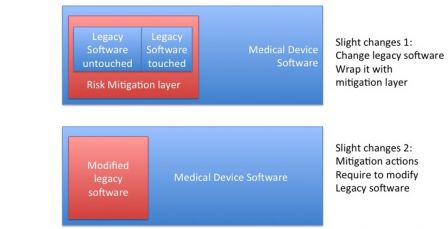
Treat legacy software as a SOUP
When changes are complete, treat the new version of the legacy software as a SOUP.
Those two phases may be planned in parallel. It's not necessary to finish the legacy software modifications to begin the design of the new device!
3rd case: Legacy software is deeply changed
Rule of thumb (bis repetita): if you have to change more that 20% of your software, redesign it!
This case arises when it's necessary to break the existing architecture or to add a big new set of functions to legacy software.
There is no miracle, the legacy software is so deeply touched that a new development cycle is compulsory. The legacy software is input data of the development cycle but it shall be redesigned along with the rest of the software it is integrated in.
Other case: Legacy software is ported to a new platform
This case is peculiar, but very common with discontinued hardware and software! The new platform may be new hardware (new microcontroller) or new software (new OS, new libraries) or both (eg: 32 bits to 64 bits). Changes made to software are:
- Technical:
- Interfaces are redesigned to work with the new platform,
- Code is fixed and recompiled to the new platform,
- Not functional:
- No existing function is modified, no new function is added,
- Existing specifications are left untouched.
This case is close to the "slight changes" case, with the major difference that the code can be deeply touched to run on the new platform.
To make it simple, it's possible to follow the same process as the one for slight changes:
- Port legacy software,
- Treat it as a SOUP.
The major difference is in the verification of the port: black-box testing is not enough. Unit testing or integration testing with modified interfaces should be necessary to demonstrate that ported software works like before.
The types of changes is not the only way to decide how to deal with legacy software. In the next post we'll see how to deal with legacy software according to their type: whether it is non-medical device software, software in a lower class or risks ... amongst others.